Vendor Onboarding
Send one link. Get a verified vendor.
Ten documents, five emails, one wrong account number.
The vendor fills in their own details, verified against the source, live in your books only once someone has approved it.
Every Vendor Detail, Collected Once And Checked At Source.
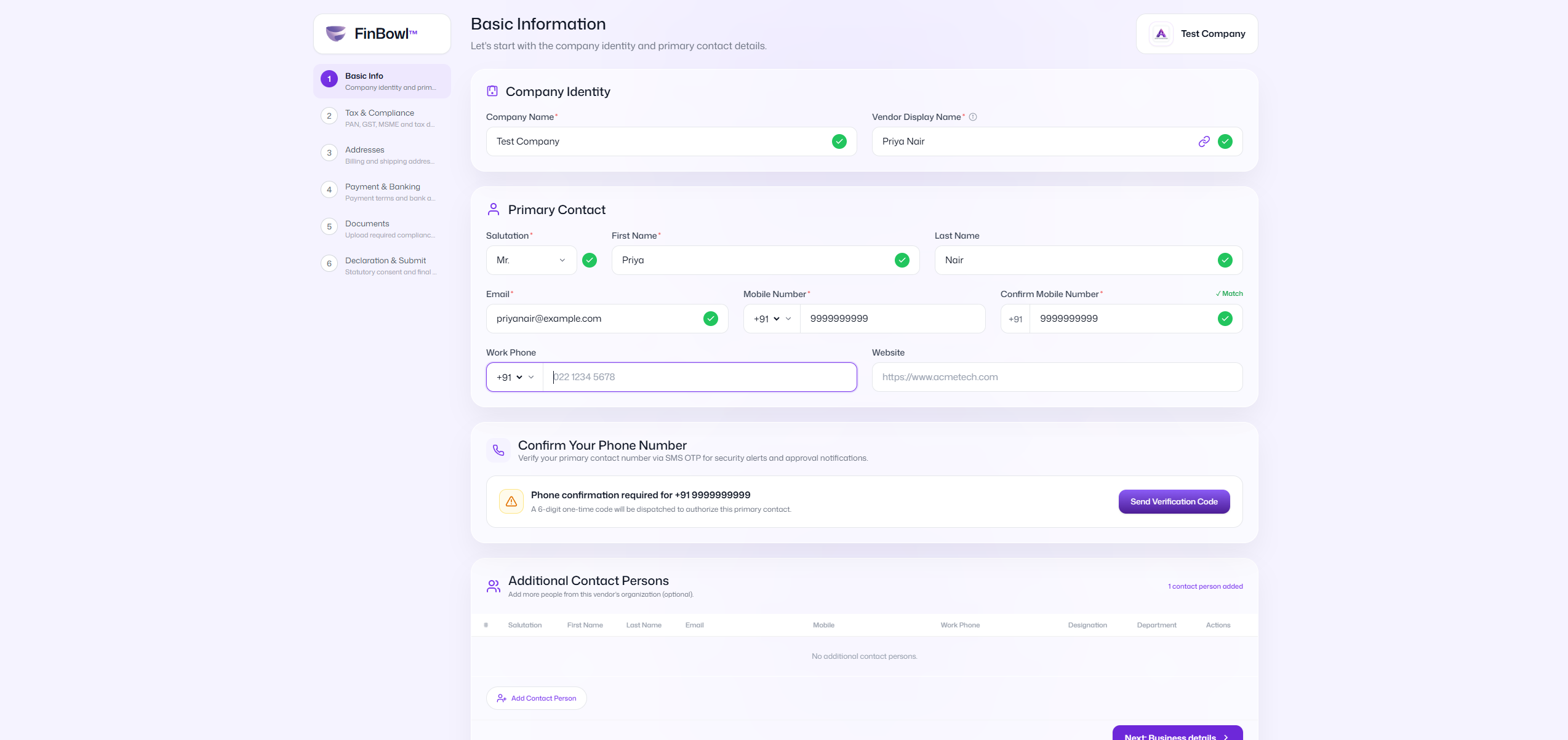
You send an invitation. The vendor opens a one-time link, confirms their mobile with a code, and fills in their own contact, tax, address, bank and document details. No login for them to create, and nothing for your team to re-type.
The submission lands in your approval queue with every answer, file and declaration attached. Only when someone approves it does a real vendor contact appear in your books.
Collected at source — the vendor types their own GSTIN, IFSC and account number, so a mis-read digit stops being your problem.
Verified automatically — GSTIN, PAN, Udyam, IFSC and the bank account are each checked against the issuing source as the vendor submits.
Nothing is created without sign-off — a submitter can never approve their own vendor, in the interface or on the server.
Built into FinBowl — the same console that runs your purchases, payments and signing. An approved vendor is available for a purchase order the moment it exists.
The Vendor Does The Typing. You Do The Deciding.
One Link, One Vendor, One Time
Each vendor holds a single usable link. Issuing a new one voids the last immediately, so there is never a second door into the same submission.
Nothing Taken On Trust
GST, PAN, Udyam, IFSC and a penny-drop on the account. Verification resets on every fresh submission, so a reviewer has to confirm the numbers rather than inherit a badge.
Shaped To Your Firm
Decide which fields and documents each vendor type is asked for, and which only appear when they apply. Every file the vendor uploads is held in your FinBowl data room.
Set Up Once, From Your Console
Your accounts team sets up vendor types, fields, documents and approval rules from the FinBowl console. Verification then runs on its own, on every submission.
Invitation To Vendor Record, In Five Steps
Invite
Send a one-time link from the Vendors screen, with a note if you want one. The email goes out with their name on it.
They Confirm Who They Are
The vendor opens the link with no login and confirms their mobile number with a one-time code before anything saved is shown.
They Fill It In
Contact, business details, statutory registrations, addresses, bank accounts and documents, saved automatically as they type.
You Review
The submission enters your approval queue with every answer, uploaded file and accepted declaration in one place. Approve, reject, or send it back with notes.
It Becomes A Vendor
On approval the vendor contact is created in Zoho Books, with the documents you flagged copied across. Everything else stays in your FinBowl data room.
A Vendor Master Assembled From Email Attachments
Vendor details arrive as forwarded PDFs, photographs of certificates and half-filled Word forms. Somebody re-types them, a digit moves, and a payment reaches the wrong account or TDS is deducted against the wrong PAN.
Stop The Re-Keying
The vendor's own answers become the vendor record. Nobody on your team transcribes an IFSC from a scanned cheque.
Ask For The Right Papers, Every Time
Required documents are enforced when the vendor submits, so an incomplete file never reaches your desk in the first place.
Know Who Accepted What
Every submission, note, rejection and approval is recorded, along with the exact wording of the declaration the vendor agreed to.
1 link
Per vendor — one live link at a time
0
Re-keying — entered by the people who have it
5
Checks at source — GSTIN, PAN, Udyam, IFSC, account
100%
Audited — every decision on the record
One Console, One Approval Engine
Vendor Onboarding sits beside P2P in the same FinBowl console, so a vendor approved here is immediately available for purchase orders, bills and payments, on the same approval rules.
Everything Vendor Onboarding Handles For You
One-Time Invitation Links
One usable link per vendor, with a live status of sent, opened, submitted or expired.
OTP-Confirmed Identity
The vendor confirms their mobile before any previously saved detail is revealed to them.
A Form You Configure
Choose which fields and documents are asked for, and which of them block submission.
Conditional Questions
Ask a proprietor for Aadhaar, a contractor for PF and ESI, and nobody else for either.
Your Own Vendor Types
Define the classifications your firm uses and drive the rest of the form off them.
GST, PAN And Udyam Checks
Verified against the source, with a match result against the name on the submission.
Bank Account Verification
IFSC lookup fills the bank and branch; a penny-drop returns the name as per bank.
Auto-Fill From The GSTIN
A valid GSTIN fills PAN, state and source of supply, never overwriting a typed answer.
Documents With Rules
PAN, Aadhaar, GST certificate, cancelled cheque, Udyam and any slot you add yourself.
Autosave And Resume
Answers save as the vendor types and survive a closed tab, right up to submission.
Request Changes With Notes
Send a fresh link listing exactly what to fix; the vendor picks up where they left off.
A Document Data Room
Every file the vendor uploads is held in FinBowl. Only the slots you flag are copied to Zoho Books.
What The Vendor Actually Sees
Onboarding By Email. Onboarding By FinBowl.
Vendor Forms Over Email
FinBowl Vendor Onboarding
Vendor onboarding is the moment payment data enters your business. It is the cheapest possible place to catch a wrong account number.
Plans For Vendor Onboarding
Launch offer · introductory pricing. Pay annually and get 1 month free.
Starter
Firms bringing on a steady handful of vendors each month
₹4,000₹2,000/month
Up to 5 users · Up to 100 vendors onboarded / month
- Self-service invitation links
- Configurable fields & documents
- Maker-checker approval
- Document data room
Professional
Most PopularFinance teams and CA firms with a high-volume vendor pipeline
₹7,000₹3,000/month
Up to 15 users · Up to 500 vendors onboarded / month
- Everything In Starter
- Vendor Types & Conditional Questions
- Custom Declarations With Versioning
- Priority Support
Enterprise
Up to 100 users · Unlimited onboarding · Everything in Professional, plus dedicated support
Verification Runs On Your Wallet
Every GSTIN, PAN, Udyam, IFSC and bank-account check calls a licensed source. Each plan carries a monthly allowance; beyond it, and on every re-run, checks are drawn from your FinBowl wallet at the published per-check rate.
Additional users ₹1,000 / user / month. Cancel any time. Prices exclude GST.
Built For Every Team That Onboards A Vendor
Finance Teams With A Growing Vendor Base
Adding suppliers every week, who want the details entered once by the people who actually hold them, and checked before a payment is ever raised.
CA Firms Running Vendor Masters For Clients
Who need every PAN, GSTIN and bank account to be verified and defensible at audit, not simply recorded because someone emailed it in.
Any Team Paying Vendors Off A Spreadsheet
If bank details currently reach you as a forwarded attachment, this replaces that with a verified form and an approval step.
Teams Already Running P2P
Every vendor approved here flows straight into purchase orders, bills and payments, on the same approval engine.
Stop Chasing Vendors For Their Paperwork.
The AI Office for your finance operations. Purchases, referrals, sales, signing and more.
console.finbowl.ai